The Law Society has been made aware of an attempted phishing attack on a solicitor’s practice. The solicitor received an email seeking a quotation for acting in a conveyancing transaction. The solicitor responded to this email asking for more details so that they could determine what work was involved and provide an informed quotation. The sender responded as follows:
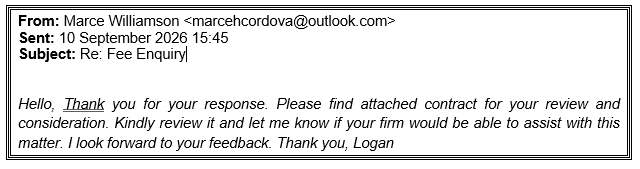
Being suspicious of the email, the solicitor informed the sender that they could not open the attachment and sought details of the property and the auctioneer. The sender responded as follows:

The solicitor stated that clicking on the Review button also did not work and again requested the property address. Later that day, the sender responded, ignoring the request for the address, and asked that the solicitor review the document. The sender followed that email up early the next day, attaching the document again and requesting that the solicitor review it.
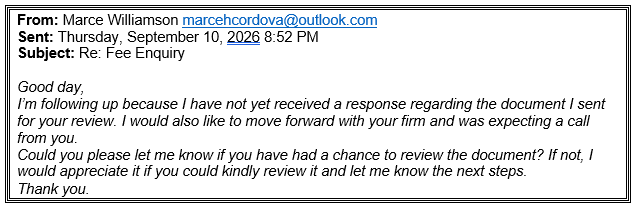
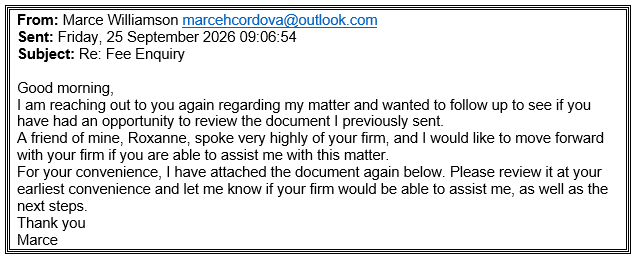
The solicitor notified the sender that they would no longer respond and was reporting the matter to the authorities.
It is noted that the initial email was signed off by “Logan” despite being sent by Marce Williamson at marcehcordova@outlook.com. No explanation was provided for this. It is also noted that the sender refused to provide any details in relation to the property and was insistent on the solicitor opening the attachment to review the details.
If you receive an email as described above:
- DO NOT click on the attachment.
- If you have a concern over the veracity of an email you are advised to request the information in the body of the email, as the solicitor did in this case. If the sender refuses to provide the information in this manner or via a phone call/meeting, you should cease corresponding with them.
- Ensure all members of staff are aware of the possibility of fraudulent attachments or links in emails and how to verify any links contained in emails by hovering over the link. The path will appear above the link which can be checked for veracity.
- If you have clicked on a suspicious attachment or link, contact your IT providers immediately and ensure they interrogate your system to ensure any malware installed is removed and the system cleaned. Also, ensure that no emails have been sent from your email address to others without your knowledge.